

How to set up kudos
For adminsUpdated Nov 1, 2026
Choose the kudos channel, limits and company values for your team.
Kudos let people thank each other in Slack and tie each thank-you to a company value. Open Settings › Kudos. There are two tabs: General settings and Company values.
Kudos must be turned on: check the switch at the top right of the page.
General settings
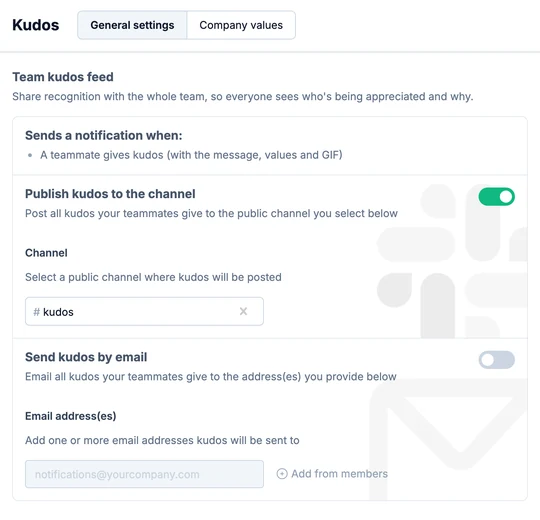
Under Team kudos feed, turn on Publish kudos to the channel and pick a public channel, like #kudos. Everyone then sees who's being appreciated and why. You can also turn on Send kudos by email and add email addresses. If you set up neither, kudos go to the recipients in a direct message.
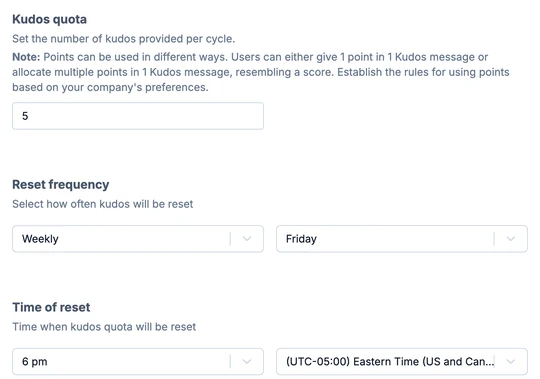
Under Kudos quota, set how many kudos each person can give per cycle. People can give one kudos per message or several at once, so decide together how you count them.
Under Reset frequency, choose Weekly and a day, or Monthly. Set the Time of reset and time zone: that's when everyone's quota is full again.
Company values
When people give kudos, they pick the value their colleague showed. That makes each thank-you more specific and shows how your team lives your culture.
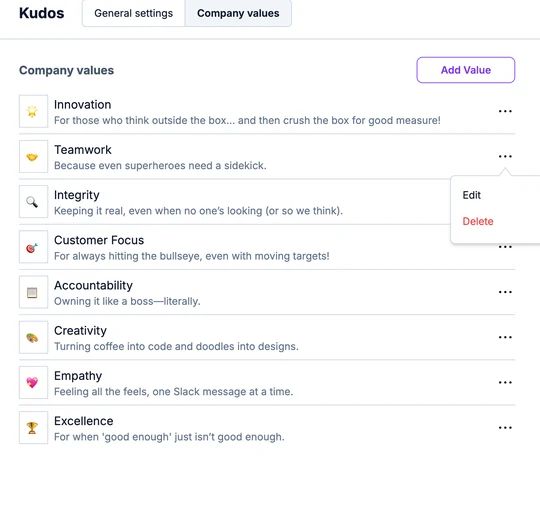
The default values are Innovation, Teamwork, Integrity, Customer Focus, Accountability, Creativity, Empathy and Excellence. Keep them, change them or write your own.
Edit or delete a value
On the Company values tab, click the three dots at the end of the value's row and choose Edit or Delete.
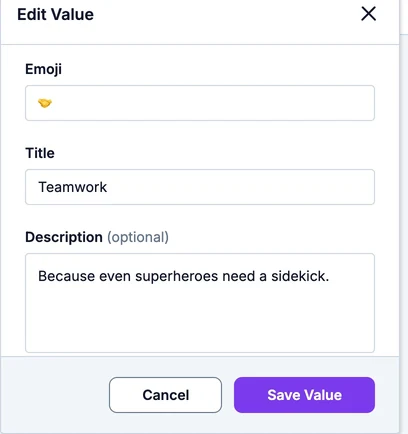
Change the emoji, title or description and click Save Value.
Add a value
Click Add Value.
Pick an emoji, enter a title and, if you like, a short description. Click Add Value.
What's next
- Introduce kudos to your team with a ready-made announcement.
- Share how to give kudos in Slack.
- To turn kudos into rewards, set up rewards.