

How to create a survey template
For adminsUpdated Nov 1, 2026
Write your own survey questions or start from a ready-made template.
Surveys tell you how your team really feels. They help you spot burnout early, measure engagement and find process problems before people leave.
You build a survey as a template, then run it whenever you need it. OrgaNice comes with ready-made templates: Engagement, Feedback and Recognition, Mental Health, Satisfaction and Work-Life Balance. You can also write your own.
Create a template
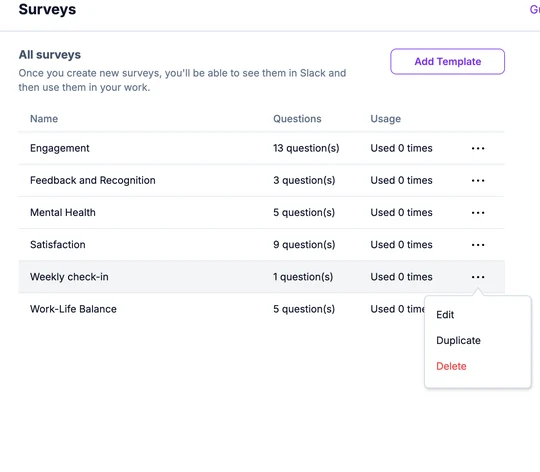
Open Settings › Surveys and click Add Template.
Enter the template name at the top, then your first question on the right.
Choose the Question type: Single choice, Multiple choice, 1 to 5 scale or Paragraph for a written answer.
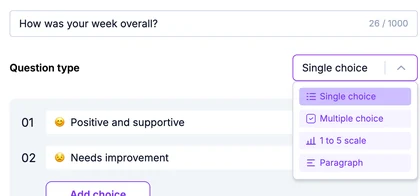
For choice questions, edit the answers and click Add choice for more. Click X next to an answer to remove it. Turn on Is this question required? if everyone must answer.
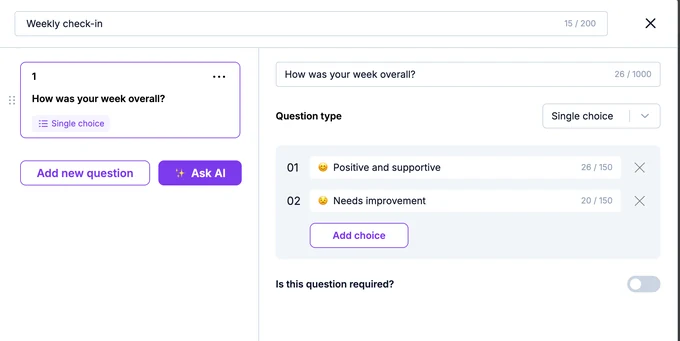
Click Add new question for the next one. Your questions are listed on the left; drag them to change the order, or click the three dots on a question to copy or delete it.
Click Save.
The template is added to the list, ready to run.
Not sure what to ask? Click Ask AI, describe what you want to learn, and the AI Assistant suggests questions you can add.
Manage templates
Click the three dots at the end of a template's row:
- For your own templates: Edit, Duplicate or Delete.
- For ready-made templates: View questions or Duplicate. To change a ready-made template, duplicate it and edit the copy.
The Usage column shows how many times each template was run.
What's next
Run a survey from your template. People answer it in Slack.